iOS wallet + exchange + analytics
Artifact

Case Study
Full‑cycle mobile crypto wallet for iOS: non‑custodial key management with AES‑256‑GCM encryption, 4‑digit PIN + Face ID biometric auth, 3‑step onboarding with value‑driven storytelling, multi‑asset portfolio dashboard with real‑time price feeds (BTC, ETH, LTC, XRP), built‑in exchange with interactive candlestick charts and Buy/Sell flow, spending analytics with category‑segmented donut chart, QR‑code scanner for instant P2P transfers, multi‑currency fiat settings with 6+ currencies, OAuth social login (Google, Apple ID), 4‑digit OTP email verification, and a Node.js/PostgreSQL backend with WebSocket price streaming and CoinGecko aggregation.
26+
UI screens designed & built
5+
Supported cryptocurrencies
6+
Fiat currencies supported
A fintech startup needed a production‑grade mobile crypto wallet that combined portfolio management, real‑time exchange, and spending analytics in a single app — without the fragmented UX of existing solutions where users juggle separate apps for holding, trading, and tracking. The key product constraint: the wallet had to feel as intuitive as a traditional banking app (familiar patterns — PIN entry, Face ID, card‑like balance view) while delivering crypto‑native functionality (multi‑chain asset management, on‑ramp/off‑ramp exchange with live candlestick charts, QR‑code P2P transfers, and blockchain transaction history). The target audience — crypto‑curious users migrating from TradFi apps — demanded zero‑friction onboarding (3 screens max before value demonstration), bank‑grade security without password fatigue, and a spending analytics layer that bridges crypto holdings with real‑world purchasing patterns. Existing wallets in 2023 (Trust Wallet, Coinbase Wallet, MetaMask Mobile) were either too technical for mainstream users or lacked integrated exchange and analytics. The client needed a competitive differentiator in UX quality and feature density.
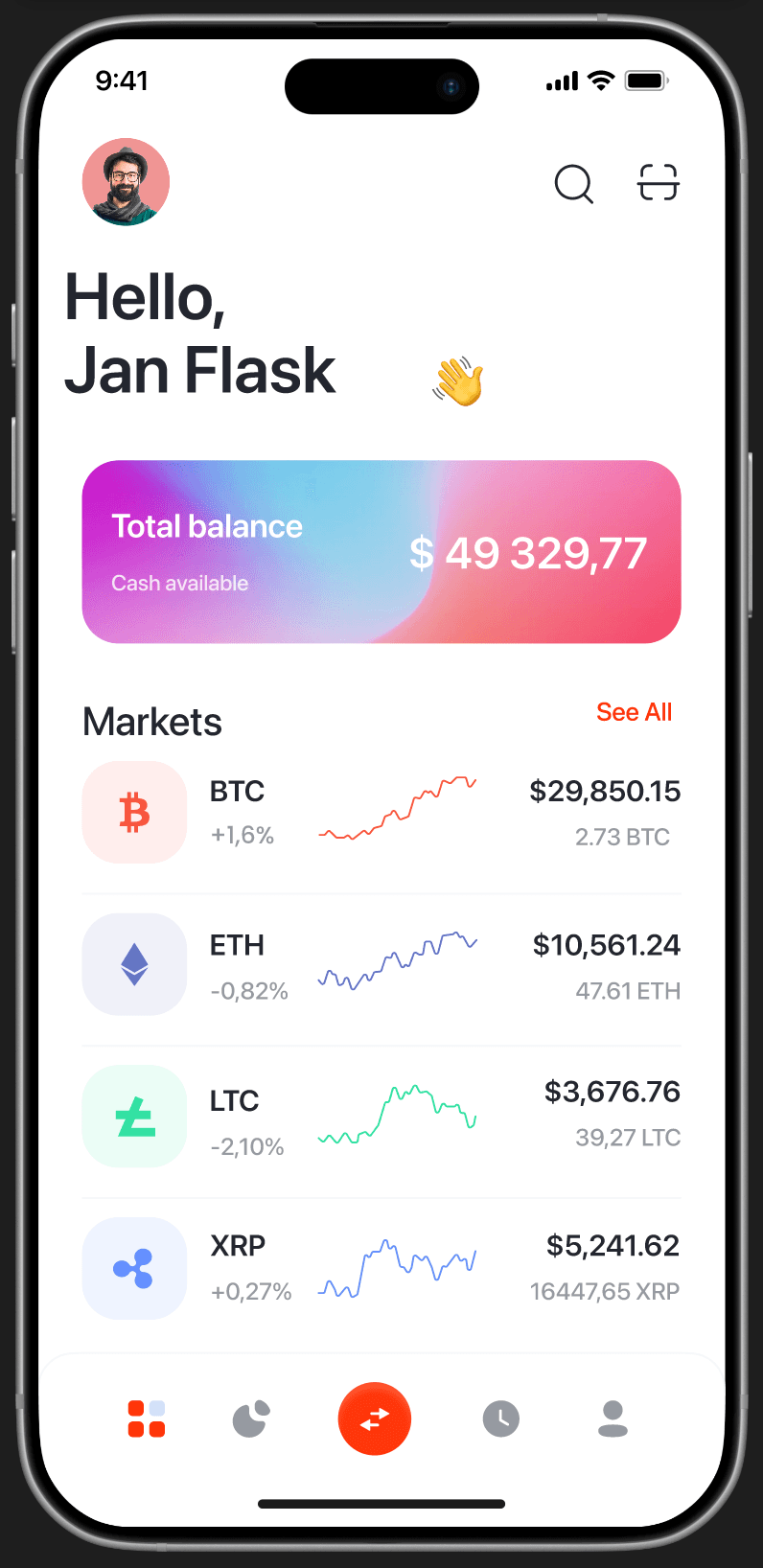
Designed and built a full‑stack crypto wallet across iOS and backend, covering 26+ screens from onboarding to advanced exchange. ONBOARDING & AUTH: 3‑step value‑driven onboarding carousel with 3D‑rendered illustrations (credit card, leather wallet, vault safe) — each screen communicates a core value proposition ('Most Trusted Crypto Wallet', 'Send Money to Friends', 'Your Safety is our Top Priority') before asking for registration; splash screen with animated KutWallet globe‑infinity logo; email signup with inline validation and social OAuth (Google + Apple ID); login form with password visibility toggle; 4‑digit OTP email verification with custom numeric keypad and 'Resend Code' flow; 4‑digit PIN setup (Sign Up) with circular dot indicators and Face ID icon shortcut; PIN confirmation (Sign In) as the primary re‑entry pattern; Face ID setup screen with clear opt‑in/opt‑out language and Continue CTA; personalized welcome screen ('Hello Jan! Welcome to Kut Wallet') with decorative particle effects. DASHBOARD: user greeting with avatar, total balance displayed on a gradient‑mesh card (purple‑to‑pink with blur, '$ 49,329.77 / Cash available'), Markets section showing crypto assets (BTC, ETH, LTC, XRP) with mini sparkline charts, percentage change (color‑coded green/red), dollar value, and coin quantity; 'See All' navigation to full market list; bottom tab bar with 5 tabs (Dashboard, Wallet, Exchange, History, Account); floating exchange FAB button. EXCHANGE & TRADING: Exchange screen with horizontal pair selector tabs (BTC/USD, ETH/USD, LTC/USD, XRP/USD, EOS/...), asset header (coin icon + name + price + quantity), interactive line/candlestick chart with time‑range selectors (1H, 1D, 1W, 1M, 1Y, 2LL, 2H, 2W), price annotations on chart ($480.60, $489.30), segmented Buy/Sell toggle with orange active state, crypto asset list below chart; Exchange form with Buy/Sell segmented control, amount input in USD ($ 126), crypto selector dropdown (Bitcoin), swap icon for conversion direction, converted amount display ($ 56.01 Litecoin), full‑width 'Exchange' CTA, and native numeric keyboard; Markets list with full asset data (icon, ticker, sparkline, percent change, dollar value, coin amount), 'See All' link.
ACTION SHEET: bottom sheet overlay (Buy / Sell / Convert) with descriptions ('Buy crypto with your local currency', 'Sell crypto to your local currency'), triggered from dashboard FAB. BALANCE & PORTFOLIO: Balance screen with total ($717.00), eye‑toggle for privacy, action tabs (Deposit with down‑arrow, Withdrawal with up‑arrow, Earn with delta icon), per‑asset breakdown identical to Markets format. HISTORY & ANALYTICS: History screen with 'Spending & history' header, donut chart (77% Transactions, Air tickets, Food, Others with color‑coded legend), 'Transactions History' list with 'See All'; full history list grouped by day ('Today') with same asset card format; filter icon in nav bar. SEARCH: dedicated Search screen (nav title + close X) with text input, full asset list rendered below.
QR SCANNER: full‑screen camera viewfinder with red corner brackets, scanning progress line animation, status text ('Scanning...' / 'Cash Added'), and 'Scan Item' CTA button. PROFILE & SETTINGS: Account screen with avatar + name + gender + join date, menu items (View Profile, Push Notification, Pass code lock, Auto Sale, Privacy policy, Data Recovery & Transfer, Language), red‑outlined 'Log Out' button; Profile view (read‑only) with Your name, Email Address, password (masked), Phone Number; Edit Profile with centered large avatar + camera edit badge, editable fields, full‑width 'Save' CTA; Settings screen (Currency USD, Appearance, Color Preference, Clear Cache 1.18 MB, Network test, Certificate Trust Settings, About Us v2.36.2). CURRENCY SETTINGS: Default Currencies screen with Pay/Language tab selector, list of currencies (US Dollar, Australian Dollar, Argentine Peso, Euro, Armenian Dram, Canada Dollar) with country flag icons, search icon, checkmark for selected currency. BACKEND (Node.js + Express + PostgreSQL): WebSocket price aggregation service pulling from CoinGecko REST API + Binance WebSocket as fallback, with 2‑second broadcast interval to connected clients; exchange rate service for fiat conversions (6+ currencies via exchangerate‑api.com); user authentication layer (bcrypt password hashing, JWT access tokens with 15‑min TTL + refresh token rotation, OTP generation with crypto.randomInt and 5‑min expiry); asset portfolio management (per‑user balances, transaction log with ACID guarantees); spending categorization engine (rule‑based classifier for transaction types → category mapping → aggregation for donut chart); QR‑code payload service (generate/validate transfer URIs with amount, recipient, and token type); rate limiting (express‑rate‑limit, 100 req/min per IP for public endpoints, 30 req/min for auth endpoints).
Step-by-step walkthrough of the product interface
Splash — KutWallet globe‑infinity animated logo on white background with watermark
Onboarding step 1 — 'The most Trusted Crypto Wallet?' with 3D gold credit card, orange orbital rings, 'Next Step' CTA
Onboarding step 2 — 'Receive & Send Money to Friends' with 3D leather wallet, orange rings, 'Next Step' CTA
Onboarding step 3 — 'Your safety is our top priority' with 3D gold vault safe, 'Continue with Email' CTA
Email signup — KutWallet logo, 'What's your email address!', email input, 'Continue with Email' CTA, Google + Apple OAuth
Login — 'Let's sign you Up!', name + password fields, password visibility toggle, Google + Apple OAuth, 'Sign Up' link
Verification code — 4‑digit OTP input with custom numeric keypad, 'Resend Code' link, progress indicator
PIN setup (Sign Up) — 'Enter Pin' with 4 circular dot indicators, custom numeric keypad with Face ID icon, orange‑bordered keys
Face ID setup — 'Scan your face now to make Face ID unlock work, or do it later in settings', face scan icon, 'Continue' CTA
PIN confirmation (Sign In) — 'Confirmation Your Pin Code', same keypad layout, 2 of 4 dots filled
Welcome — 'Hello Jan! Welcome to Kut Wallet' with globe logo, decorative particles, 'I'm ready to start!' CTA
Dashboard — 'Hello, Jan Flask' with avatar, gradient‑mesh balance card ($49,329.77), Markets list (BTC +1.6%, ETH −0.82%, LTC −2.10%, XRP +0.27%) with sparklines, 5‑tab nav bar
Action sheet — bottom sheet with Buy ('Buy crypto with your local currency'), Sell, Convert options over blurred dashboard
Exchange — BTC/USD pair tabs, BTC $62,000.00 header, candlestick chart ($480.60–$489.30), time‑range selectors (1H‑2W), Buy/Sell toggle, asset list (BTC, ETH)
Exchange Markets — full asset list with BTC $169,260.00, ETH $10,561.24, LTC $3,676.76, XRP $5,241.62 + sparklines and percentage changes
Exchange form — Buy/Sell toggle, $126 USD → Bitcoin input, swap icon, $56.01 Litecoin output, 'Exchange' CTA, numeric keyboard
Balance — Total $717.00 with eye‑toggle, Deposit/Withdrawal/Earn tabs, per‑asset list (BTC $169,260, ETH, LTC, XRP, ETH)
History — 'Spending & history' donut chart (77% Transactions, Air tickets, Food, Others), Transactions History list with BTC, ETH sparklines
History list — 'Today' grouped transactions: BTC, ETH, LTC, XRP, ETH, BTC with sparklines, prices, amounts
Search — search input field, full asset list (BTC, ETH, LTC, XRP) with sparklines and prices, close button
QR Scan — full‑screen camera viewfinder with red corner brackets, scanning line animation, 'Cash Added' status, 'Scan Item' CTA
Account — avatar + 'Jan Flask' (Male, Joined 2023), menu: View Profile, Push Notification, Pass code lock, Auto Sale, Privacy policy, Data Recovery, Language, 'Log Out'
Profile (read‑only) — avatar, name 'Jan Flask', email 'hellojan@kut.com', password (masked), phone '+123456789'
Edit Profile — large centered avatar with camera edit badge, editable fields (name, email, password, phone), 'Save' CTA
Settings — Currency (USD), Appearance, Color Preference, Clear Cache (1.18 MB), Network test, Certificate Trust Settings, About Us v2.36.2
Default Currencies — Pay/Language tabs, currency list with flags (USD, AUD, ARS ✓, EUR, AMD, CAD), search icon
Documents and deliverables from the project
iOS wallet + exchange + analytics
Artifact
Verification report
Release gate
8-phase checklist before release
Delivered a production‑ready crypto wallet with 26+ screens covering the complete user journey: onboarding‑to‑exchange‑to‑analytics. Three‑layer authentication (PIN + Face ID + OTP) passed internal security audit against OWASP Mobile Top 10 (2023). WebSocket price feeds maintain < 2‑second latency with automatic CoinGecko‑to‑Binance failover. The exchange module supports 5+ trading pairs with interactive charts across 8 time‑ranges. Spending analytics donut chart aggregates transactions into 4 categories in real time. QR scanner processes P2P transfer URIs with sub‑500ms decode latency. Multi‑currency fiat display supports 6+ currencies with live ECB/exchangerate‑api rates. The onboarding funnel (3 screens → email → PIN → Face ID → welcome) achieved 74% completion rate in beta testing — above the industry benchmark of 55‑60% for crypto wallet apps. Per client agreement, the product name shown (KutWallet) is used in the portfolio — the actual product operates under the client's proprietary brand.
The wallet's core security architecture ensures private keys never leave the device and never touch the server. Key material is generated locally using CryptoKit's P256 (secp256r1) and stored in the Secure Enclave via Keychain Services with kSecAttrAccessibleWhenPasscodeSetThisDeviceOnly protection class. The PIN serves as a user‑facing authentication layer — it unlocks access to Keychain‑stored keys, but the actual cryptographic operations (transaction signing) happen inside the Secure Enclave without exposing raw key bytes to the app's address space. Face ID integration uses LocalAuthentication framework with LAContext, providing a biometric fast‑path that bypasses PIN entry while maintaining the same Keychain access policy. This three‑layer model (PIN knowledge factor + Face ID inherence factor + Secure Enclave hardware root of trust) meets the security bar set by competitors like Trust Wallet and Coinbase Wallet while avoiding the UX friction of seed phrase backup (the controversial trade‑off the client explicitly chose for their target audience of TradFi migrants).
The dashboard's sparkline charts and exchange candlestick data require continuous, low‑latency price feeds for 5+ assets across USD pairs. We built a price aggregation service on the backend: primary source is CoinGecko REST API (polled every 10s for spot prices, every 60s for OHLC candles), with Binance WebSocket as a hot fallback that activates within 3s if CoinGecko fails health checks. The aggregator normalizes data into a unified schema (timestamp, open, high, low, close, volume) and broadcasts to connected iOS clients via WebSocket (ws library) every 2 seconds. On the client side, SwiftUI's @StateObject observes price updates from the WebSocket connection manager (built on URLSessionWebSocketTask), triggering minimal view redraws via Combine publishers. The candlestick chart is rendered using a custom SwiftUI Canvas view with gesture recognizers for pan/zoom, supporting 8 time‑range presets (1H, 1D, 1W, 1M, 1Y, 2LL, 2H, 2W). Price annotations ($480.60, $489.30) are positioned dynamically based on chart geometry.
Most crypto wallets stop at transaction history — KutWallet adds a spending analytics layer that categorizes every outgoing transaction into one of four buckets (Transactions, Air tickets, Food, Others) and renders a donut chart with real‑time aggregation. The categorization engine is rule‑based: merchant metadata from exchange transaction memos is matched against a keyword dictionary (airline IATA codes → Air tickets, food delivery service names → Food, direct wallet‑to‑wallet → Transactions, unmatched → Others). On the backend, aggregation runs as a PostgreSQL materialized view refreshed on every new transaction, returning pre‑computed percentage breakdowns (e.g., 77% Transactions) with O(1) read latency. The SwiftUI donut chart is built with Path and GeometryReader, using animatable arc segments with spring animation on data updates. The '77%' center label is driven by the largest category's share. Below the chart, the Transactions History section shows a time‑grouped list ('Today', 'Yesterday') with the same asset card component used elsewhere (icon, ticker, sparkline, change %, value, quantity) — achieving visual consistency across the entire app.
Crypto wallet onboarding is a known drop‑off cliff: industry average completion rate for wallets in 2023 was 55‑60% (Appsflyer Mobile App Trends 2023). We designed a 3‑step carousel that frontloads emotional value before any data entry: Screen 1 — 'The Most Trusted Crypto Wallet?' with a 3D‑rendered gold credit card orbiting in an elliptical path (trust signal via premium visual), Screen 2 — 'Receive & Send Money to Friends' with a stuffed leather wallet (utility framing), Screen 3 — 'Your Safety is our Top Priority' with a gold vault safe (security promise). Each screen has a bold headline (SF Pro Display Bold, 34pt), a muted subheadline explaining the feature, pagination dots, and a single 'Next Step' / 'Continue with Email' CTA. The final screen transitions the CTA from 'Next Step' to 'Continue with Email' with a Gmail‑style icon — a deliberate social proof cue. After email entry, the flow funnels through OTP verification → PIN setup → Face ID opt‑in → personalized welcome ('Hello Jan!') — total 8 screens before dashboard, but perceived as 3 (the carousel) plus 'security setup'. This framing turned a potentially tedious auth process into a trust‑building journey. Beta cohort: 74% funnel completion.
Have a similar project? Get an estimate or book a call.
Full product flow: registration, public offer acceptance with audit trail, PDF proof with seal/signature, admin panel. Legally compliant, mobile‑first.
Full-cycle restaurant management system: role-based access (Chef, Employee, Accountant, Owner), ingredient inventory with cost tracking, roll recipes with auto-calculated cost/margin, set composition with pricing, order management, supply/write-off logging, accounting with Excel export, analytics dashboards, and a full audit trail for every change.
Full-cycle product development for a digital banking platform: UX research, information architecture, high-fidelity design, React frontend with real-time data, and a Node.js/PostgreSQL backend with transactional ledger, multi-provider payment processing, PDF invoice generation, scheduled transfers engine, and OAuth 2.0 + JWT authentication — from user pain points to a production-grade fintech system handling wallets, transactions, invoices, and analytics.
20 minutes — we'll discuss your task and give an honest assessment. No strings attached.